Which finish date
can you really promise?
Run your own schedule, logic and risks included, 10,000 times. You get the P50, P80 and P90 dates, and you see which risks push the date out.
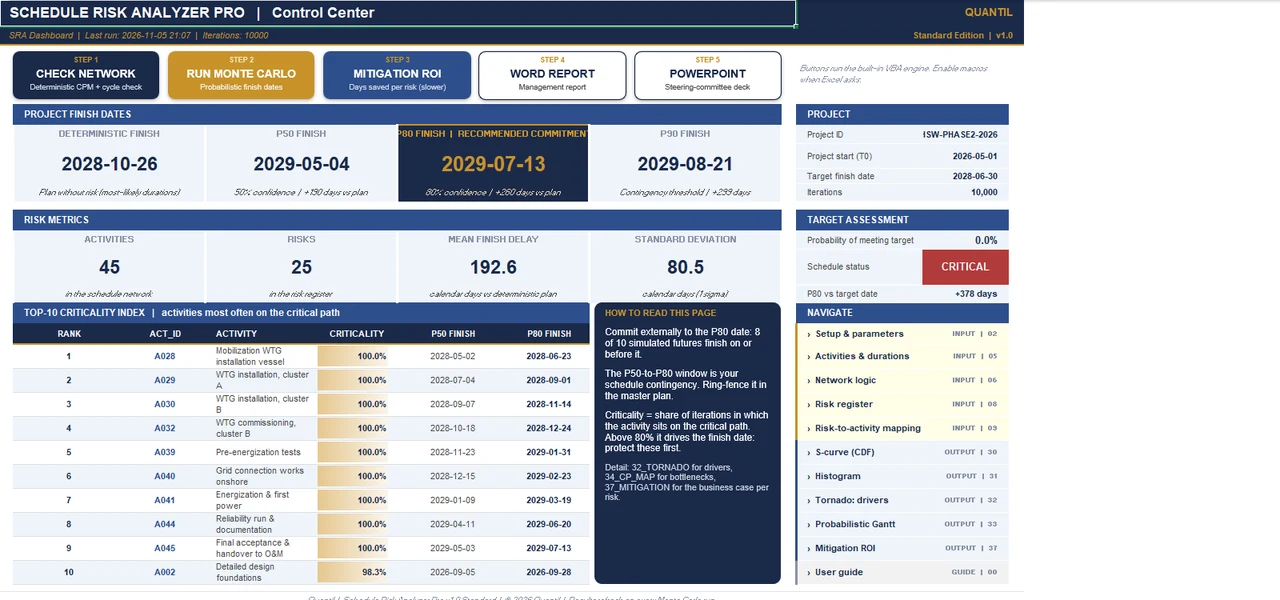
See it in action.
Recorded live in Microsoft Excel, on a fictional project case.
Watch the step-by-step tutorial (26 min, YouTube)
Three questions it answers.
To commit to a realistic date.
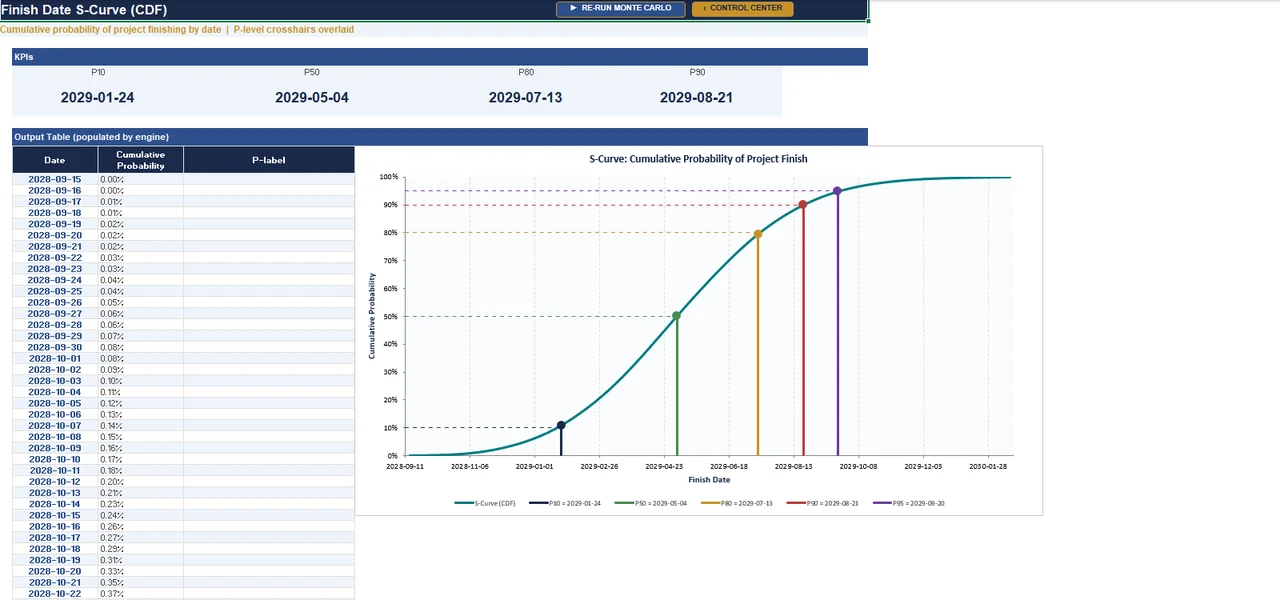
When will we really finish?
Monte Carlo on the network logic gives the P50, P80 and P90 completion dates.
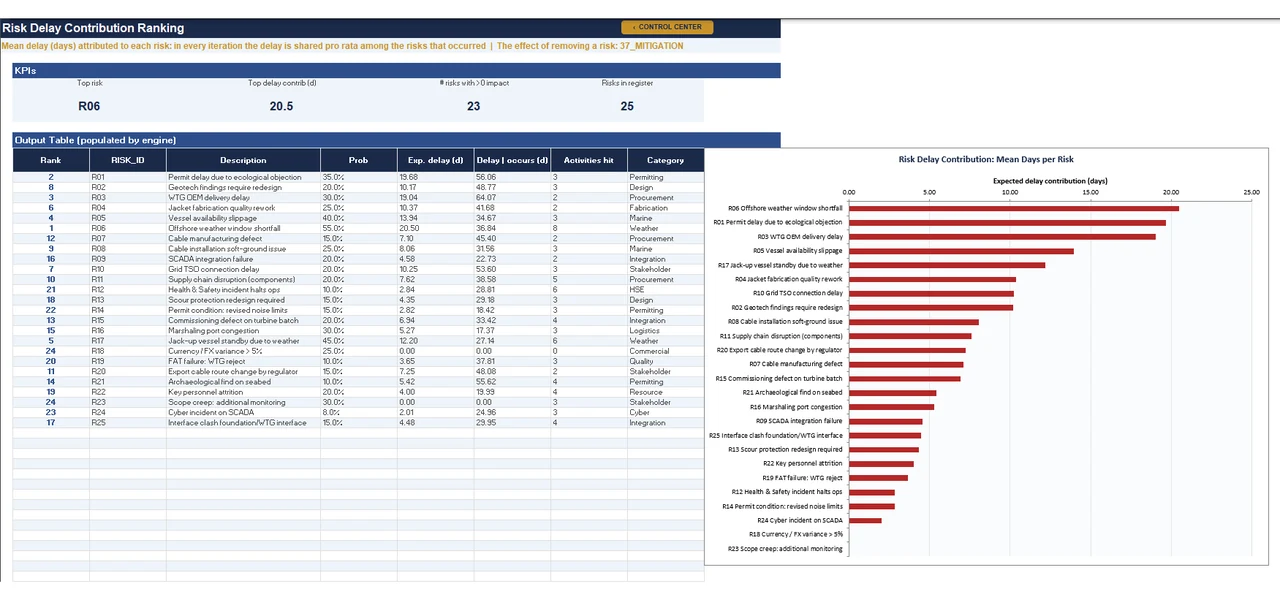
Which risks move the date?
Risks are linked to activities, so you see which ones drive the delay.
Can we use our own plan?
Enter activities and logic, or import a Primavera P6 schedule directly.
What’s inside.
Everything runs in Excel on your own machine.
- Real CPM networkActivities and logic links are calculated as a network, not as a single duration.
- Up to 200 activities and 50 risksEnough for a summary schedule of a major project.
- Primavera P6 importReads P6 XER files, with an import guide and a test schedule.
- Report and board packA Word report and a PowerPoint board pack generated from the results.
- Reproducible resultsThe seed is fixed, so every run returns the same dates.
- Built for Excel on Windows64-bit Excel on Windows 10 or 11. Mac workbooks are included but not yet field-tested.
Numbers you can check.
Every package ships with a reference case and the exact values it should return.
Check your installation: the reference case Hollin Sands Wind Phase 2 (fictional, in the workbook without P6 import that is also in the package) returns plan 26 Oct 2028, P50 10 May 2029, P80 21 Jul 2029 and P90 29 Aug 2029 at seed 20260421. The free Demo (25 activities, 2,000 iterations) returns plan 26 Oct 2027, P50 15 Feb 2028, P80 4 Apr 2028 and P90 29 Apr 2028. How we validate ›
Editions.
One license gives you the paid editions in the package; the free Demo is for everyone.
Full package
Schedule risk analysis on your own network, with Primavera P6 import.
- Up to 200 activities and 50 risks
- Monte Carlo P50, P80 and P90 dates
- P6 XER import, import guide and test schedule
- Word report and board pack
Demo
For evaluation.
- Up to 25 activities
- 2,000 iterations, no P6 import
- Free to share unchanged, for evaluation
System requirements.
| Software | Microsoft Excel desktop, 64-bit: Microsoft 365, 2024, 2021 or 2019 on Windows 10 or 11, with macros enabled. 32-bit Excel is not supported. |
|---|---|
| Reports | Word and PowerPoint desktop for Windows for the report and the board pack. |
| In the package | Workbooks for Windows: the P6 workbook with XER import, a workbook without P6 import, and the Demo (plus Mac versions, not yet field-tested); complete user guide, ten-minute briefing, quick start and reference card, example Word reports and PowerPoint board packs, quality brief, verification note with Python script, the P6 import guide, a test schedule with its expected result, the P6 reference script, the DHN-380 use case and the license documents. |
| Privacy | The tool runs entirely locally. Nothing is sent or collected; no internet connection is needed after download. |
| License | Personal license: one named user on at most two devices, for your own projects and the projects you analyze for clients. See the license summary. |
Try it before you buy.
The free demo runs the same engine as the full tool, on a smaller case. Run it, look around the sheets and compare your result with the reference value on this page.
- Up to 25 activities
- 2,000 iterations, no P6 import
- Free to share unchanged, for evaluation
Enter your name and email address; the download link arrives in your inbox right away.
Questions.
Which version of Excel do I need?
Microsoft Excel desktop, 64-bit: Microsoft 365, 2024, 2021 or 2019 on Windows 10 or 11, with macros enabled. 32-bit Excel is not supported.
Does it work on a Mac?
Built and tested for Excel on Windows. The package also contains Mac workbooks, but they have not yet been field-tested on a Mac. The Word report and the PowerPoint board pack need Windows.
Our IT department blocks macros. What now?
Windows often blocks macros in downloaded files. Right-click the file, choose Properties, tick Unblock, then reopen it and click Enable Content. The package includes the system requirements to share with your IT department. The tool runs entirely on your own computer and sends no data anywhere.
Can I use it for client projects?
Yes. The license covers your own projects and the projects you analyze for clients. You may share the reports and results you produce; the software itself stays with the licensed user. See the license summary.
How many computers can I install it on?
One named user on at most two devices, for example a desktop and a laptop. For a team, each user needs a license.
How do I receive the tool?
Right after payment you receive a download link by email. The package unzips to a folder with the workbooks, the user guide and the license documents.
Why do you ask for my email address for the free demo?
The download link is sent to your email address. If you tick the box to hear from us, we send a short message a few days later to ask how the demo went, with tips for a first run, and occasionally product news; you can unsubscribe in every message. We never share your address.
Are updates included?
Yes. Updates are free for 12 months from the date of purchase, and email support at [email protected] is included for the same period.
How are VAT and invoices handled?
Our sales platform, Payhip, handles the payment and VAT or sales tax, and sends you a receipt for your administration.
Can we pay by invoice or purchase order?
Yes. Email [email protected] with your company details, the tool and the number of users. We send a quote, and an invoice once you approve it. For three or more users we offer a team price.
Can I get a refund?
If the tool doesn’t run on your system, or doesn’t do what its page describes, email [email protected] within 14 days of purchase. We’ll fix it, or you get your money back. Not sure it fits your work? Try the free demo first: it runs the same engine.
Who can buy it?
Quantil tools are sold for business and professional use only, including independent consultants. They are not sold to consumers.
Does the tool decide for me?
No. It shows the consequences of your inputs, so you can decide with the numbers in front of you. The decision stays with your sponsor, project board or client.
Get the Schedule Risk Analyzer Pro.
- Workbooks for Windows: the P6 workbook with XER import, a workbook without P6 import, and the Demo (plus Mac versions, not yet field-tested); complete user guide, ten-minute briefing, quick start and reference card, example Word reports and PowerPoint board packs, quality brief, verification note with Python script, the P6 import guide, a test schedule with its expected result, the P6 reference script, the DHN-380 use case and the license documents.
- A personal license for one user on up to two devices. Read the license
- Free updates and email support for 12 months.
- Doesn’t the tool run on your system, or doesn’t it do what this page describes? Let us know within 14 days. We’ll fix it, or you get your money back.
Buying through your purchasing department? Ask for a quote and pay by invoice. Three or more users? Ask for a team price.
Need more than one tool? Decision Chain Bundle: all 5 tools for $2,795 instead of $3,775.
Launch offer: 20% off with code LAUNCH20 at checkout, until December 31, 2026.
Secure checkout through PayhipCard or PayPalVAT handled, receipt for your recordsInvoice on request14-day guarantee
Prices in USD, excluding VAT or sales tax. For business and professional use. Payment and tax are handled by our sales platform, Payhip.
Guides on this topic.
Merge bias: why parallel paths make you late
Three teams are each 80% sure of week 40. The milestone that waits for all three has about a coin-toss chance. How merge bias works, and what to do about it.
Read the guideExcel tools, add-ins or dedicated risk software?
Three kinds of tools run a Monte Carlo risk analysis. A fair comparison, including when a dedicated product is the better choice, and five questions to ask before you pick one.
Read the guideQSRA in Excel: quantitative schedule risk analysis
A schedule gives you one finish date; a QSRA tells you how likely it is and which date you can commit to. What you need, the steps, how to read the results, and when Excel is enough.
Read the guide